Building Applications
Dynamic Content
Structr renders all page content on the server. To display data from the database or other sources, you use template expressions and scripting. Template expressions let you insert dynamic values into your pages, while scripting gives you full control over data retrieval and processing. This chapter builds on the concepts introduced in the Pages & Templates chapter.
How Structr Differs from Client-Side Frameworks
If you are familiar with client-side frameworks like React, Vue, or Angular, Structr’s approach to dynamic content may feel different at first. Understanding these differences helps you work with Structr effectively.
Server-Side by Default
Structr is not a rich-client stack. Like other server-side rendering approaches, most of the work happens on the server. Structr follows principles similar to the ROCA style (Resource-Oriented Client Architecture): the server renders HTML, the URL identifies resources, and the server controls the application logic.
Everything is Accessible
What sets Structr apart is how accessible everything is. All the layers of a typical web application exist – data model, business logic, rendering, user interaction – but they are thin and within reach. You sit in a control room where everything is at your fingertips, rather than having to dig through separate codebases for each concern.
The data model can be changed live without migrations – existing data immediately gets the new attributes. Repeaters give you direct access to query results. Template expressions let you bind data to elements without intermediate layers. Event Action Mappings connect user input directly to backend operations.
State on the Server
Structr does have state management, but it happens on the server by default. The URL determines what is displayed, and the current keyword gives you the object resolved from the URL. For user-specific state, you can store values directly on the user object via me, or create dedicated Settings objects in the database.
A Different Mindset
Structr brings data and frontend closer together than traditional frameworks. You access data directly in your page elements through template expressions and repeaters, without the need for client-side state management or passing data through component hierarchies. This directness can feel unfamiliar at first, but once you embrace it, you may find that many common tasks require less code than you expect.
Template Expressions

Template expressions allow you to insert dynamic values anywhere in your pages. You can use them in content elements, template elements, and HTML attributes.
StructrScript vs. JavaScript
Structr supports two scripting syntaxes: StructrScript and JavaScript.
StructrScript
StructrScript uses single braces ${...} and is designed for simple, one-line expressions. It works well in HTML attributes, show conditions, and simple function queries. Typical uses include property access and function calls:
${current.name}
${project.status}
${empty(current)}
${is(current.isActive, 'active')}
${if(equal(current.status, 'draft'), 'Draft', 'Published')}
StructrScript is purely functional – you cannot declare variables or perform arithmetic operations directly. It also supports default values using the ! syntax:
${request.page!1}
This returns the value of the page request parameter, or 1 if the parameter is not set.
JavaScript
JavaScript uses double braces ${{...}} and opens a full scripting context. Use it when you need calculations, intermediate values, or more complex logic:
${{ current.price * current.quantity }}
${{
    let total = 0;
    for (let item of items) {
        total += item.amount;
    }
    return total;
}}
In JavaScript, you handle missing values with standard JavaScript syntax, for example using the logical OR operator to fall back to a default value:
${{ $.request.page || 1 }}
As a rule of thumb: if it fits in a single-line input field, use StructrScript. If you need variables, loops, or calculations, switch to JavaScript.
Keywords
Template expressions have access to built-in keywords that provide context about the current request, user, and page. The most commonly used keywords are:
current– the object resolved from the URL (see Navigation & Routing)me– the current userpage– the current pagerequest– HTTP request parametersnow– the current timestamp
For a complete list of available keywords, see the System Keywords reference.
Functions
Structr provides a wide range of built-in functions for string manipulation, date formatting, collections, logic, and more. Some commonly used functions include:
empty()– checks if a value is null or emptyis()– returns a value if a condition is true, null otherwiseequal()– compares two valuesif()– conditional expressionfind()– queries the databasedateFormat()– formats dates
For a complete list of available functions, see the Built-in Functions reference.
Dynamic Attribute Values
You can use template expressions in any HTML attribute. This allows you to create elements that change their appearance or behavior based on data, such as dynamic CSS classes, inline styles, or link URLs.
<a href="/projects/${project.id}">${project.name}</a>
The is() function is useful for conditionally adding values. It returns null when the condition is false, which means the value is omitted from the output.
<tr class="project-row ${is(project.isUrgent, 'urgent')}">
Structr handles attribute values as follows: attributes with null values are not rendered at all, and attributes with an empty string are rendered as boolean attributes without a value.
The examples above show complete HTML markup as you would write it in a Template element. For regular HTML elements like Div or Link, you enter only the expression (e.g., /projects/${project.id}) in the attribute field in the properties panel.
Auto-Script Fields
Some input fields in the Structr UI are marked as auto-script fields. These fields automatically interpret their content as script expressions, so you do not need the ${...} wrapper. Auto-script fields include Function Query, Show Conditions, and Hide Conditions. You can recognize auto-script fields in the Admin User Interface by their characteristic ${} prefix displayed next to the input field.
Auto-script fields are a natural fit for StructrScript expressions since they are typically single-line inputs.
Repeaters
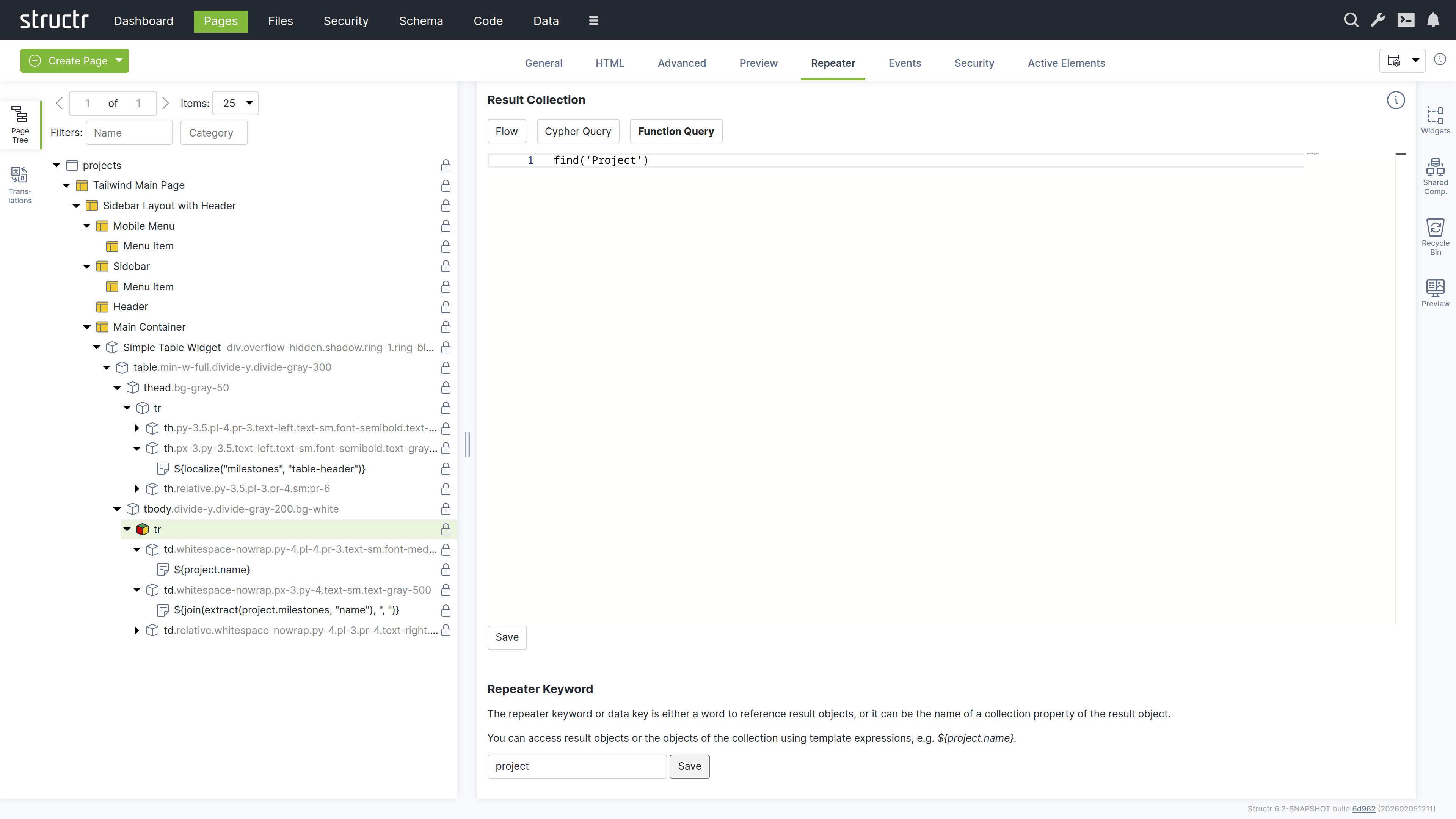
To display collections of data, you configure an element as a repeater. The repeater executes a query and renders the element once for each result. This is the primary way to display lists, tables, and other data-driven content in Structr.
Repeater Basics
A repeater has two essential settings: a data source and a data key. The data key is the variable name under which each object is available during rendering.
For the data source, you can choose one of three options:
- Flow: A Structr Flow that returns a collection
- Cypher Query: A Neo4j Cypher query
- Function Query: A script expression
Only one data source can be active at a time.
Filtering and Sorting
In JavaScript, you can refine your query by passing an object with filter criteria to $.find(). For sorting, use the $.predicate.sort() function.
$.find('Project', { status: 'active' }, $.predicate.sort('name'))
This returns all projects with status “active”, sorted by name.
Pagination
For large result sets, use pagination to limit the number of items displayed. Structr provides a page() predicate that works with request parameters.
In StructrScript:
find('Project', page(1, 25))
In JavaScript:
$.find('Project', $.predicate.sort('name'), $.predicate.page(1, 25))
The first argument is the page number (starting at 1), the second is the page size. You can make the page number dynamic using request parameters:
find('Project', sort('name'), page(request.page!1))
This reads the page number from the URL (e.g., /projects?page=2) and defaults to page 1 if not set.
Performance Considerations
Structr can render thousands of objects and generate several megabytes of HTML without problems. However, displaying large amounts of data rarely makes sense for users. A page with thousands of table rows is difficult to navigate and slow to load in the browser.
Best practices:
- Always limit result sets with pagination or a reasonable maximum
- Use filtering to show only relevant data
- Consider whether users really need to see all data at once, or whether search and filters are more appropriate
Nested Repeaters
Repeaters can be nested to display hierarchical data. The inner repeater can use relationships from the outer repeater’s data key as its function query.
For example, to display a list of projects with their tasks, you create an outer repeater with find('Project') and data key project. Inside, you add an inner repeater with project.tasks and data key task. The outer repeater iterates over all projects, and for each project, the inner repeater iterates over its tasks.
Note that data keys in nested repeaters must be unique. If you use the same data key in a nested repeater, the inner value overwrites the outer one.
Empty Results
When a repeater query returns no results, the element is not rendered at all. If you want to display a message when there are no results, add a sibling element with a show condition that checks for empty results:
empty(find('Project', { status: 'active' }))
This element only appears when there are no active projects.
Static Data
A Function Query can also return static data directly by defining a JavaScript object or array. This is useful for prototyping or for data that does not come from the database:
${{ [{ name: 'Draft' }, { name: 'Active' }, { name: 'Completed' }] }}
Data-Driven Components
Repeaters give you full control over how data is queried and rendered, but they require you to build the HTML structure manually: you create the elements, configure the query, set up the data key, and write the template expressions yourself. For common patterns like tables, lists, and forms, data-driven components offer a higher-level approach. You point a data-driven component at a DataSource, configure which fields to display in a dialog, and the component handles the rendering, pagination, filtering, and field layout automatically. See the Widgets & Components chapter for details.
Show and Hide Conditions
Show and hide conditions control whether an element appears in the page output. Structr evaluates these conditions at render time, before the element and its children are rendered.
How It Works
Each element can have a show condition, a hide condition, or both. The element is rendered only when the show condition evaluates to true (if set) and the hide condition evaluates to false (if set). If both are set, both must be satisfied for the element to render.
Show and hide conditions are auto-script fields. You write the expression directly without the ${...} wrapper.
Complex Conditions
For conditions with multiple criteria, use the and() and or() functions:
and(not(empty(current)), equal(current.status, 'active'))
This shows the element only when current exists AND has status “active”.
or(equal(me.role, 'admin'), equal(current.owner, me))
This shows the element when the user is an admin OR is the owner of the current object.
You can nest these functions for more complex logic:
and(not(empty(current)), or(equal(me.role, 'admin'), equal(current.owner, me)))
Show Conditions vs. Permissions
Show and hide conditions control visual output only. They are not a security mechanism. To restrict access to data, use visibility flags and permissions instead. For details, see the Access Control section in the Overview chapter.
Combining List and Detail View
A common pattern in Structr is to implement both a list view and a detail view on the same page. You control which view is displayed using show and hide conditions based on the current keyword.
When a user navigates to /projects, no object is resolved and current is empty – the list view is displayed. When a user navigates to /projects/a3f8b2c1-..., Structr resolves the Project object and makes it available as current – the detail view is displayed.
To implement this, you create two sibling elements: one for the list view with a show condition of empty(current), and one for the detail view with a show condition of not(empty(current)). Only one of them is rendered, depending on whether an object was resolved from the URL.
Side-by-Side Layout
A more advanced version displays both views side by side, similar to an email inbox. The list remains visible on the left, and the detail view appears on the right when an item is selected. You can highlight the selected item in the list by adding a dynamic CSS class that compares each item with current:
${is(equal(project, current), 'selected')}
This layout is easy to build using card components or similar block-level elements. Each card has a header and content area, one for the project list and one for the project details. This eliminates the need for separate pages and routing logic that you would typically write in other frameworks.
Page Functions
Structr provides several functions that are specifically designed for use in pages and templates.
render()
The render() function outputs child elements at a specific position. Templates and Shared Components do not render their children automatically, so you use render(children) to control where they appear. You can also render specific children using render(first(children)) or render(nth(children, 2)).
include()
The include() function lets you include content from other elements or objects. You can include elements from other parts of the page tree or render objects from the database.
includeChild()
The includeChild() function works like include(), but specifically for child elements. It allows you to include a child element by name or position.
localize()
The localize() function returns a translated string for the current locale. You pass a key and optionally a domain. For details on translations, see the Translations section in the Pages & Templates chapter.
Next Steps
This chapter covered how to display dynamic content: template expressions for values, repeaters for collections, and show/hide conditions for conditional rendering.
To handle user input – forms, button clicks, and other interactions – see the Event Action Mapping chapter.